Gmail to PST Export Tool
Download Gmail mailbox to PST File without Outlook
Are you Struggling to Download Gmail Emails to PST Format?
“Gmail is one of the most secure email services and is used by more than 1.5 billion people. But still, it does not guarantee 100% safety. Every year, attackers use different techniques and get easy access to the user's Gmail account and delete all emails after stealing the required information. Experts agree that although the Gmail antivirus scanner is a good first line of defense, it is not extensive enough.”
So the first question arose: How can we protect our e-mails?
There are numerous ways to secure your account, but that too does not guarantee 100% protection against spammers and hackers. You must regularly back up your Gmail account on your computer.

Today I discuss how you can easily export Gmail emails to PST format. There are two methods to export Gmail mailbox to PST format. The first method requires Outlook installation in your system and the other is a professional approach of saving emails from Gmail to PST.
Using Outlook Installation
There is no free solution available to export Gmail to PST file. For this method you need to have Outlook installed in your system. When it comes to download Gmail as PST format using Outlook, you typically do not get the result that you want. While you may still choose for this method, you need to be aware of risks involved using this method.
1. Time Consuming: This method is very time consuming. You need to wait for several hours or days for complete configuration of Inbox emails of your Gmail account. And this method still not gurantees for saving of complete Gmail emails to PST format.
2. Only Inbox Emails: Using this method you can save emails from Inbox folder only, as during the sync method outlook only syncs Inbox emails only. So that you have to sacrifice all emails in your Sent mails, Outbox, Drafts and other customized folders.
3. Broken Images: After downloading Gmail emails to PST with MS Outlook, photos, images and other images inserted in your messages can be displayed as broken images in the PST file. They are not visible in the body of your emails.
4. Might Lose Emails and Attachments: There is a good chance that you will lose many emails during this procedure because MS Outlook was not made to Backup Gmail emails to PST format.
The risk list of this method is much more. You can choose a reliable method to save your Gmail emails as a PST format or you can opt for a free solution if you still want to save with this method. Read the steps to save Gmail as PST with Outlook...
Steps to Download Gmail Emails to PST File
Step 1. Configure Your Gmail account in Outlook Application.
(It may take several hours or days depending on the size of the data)
Step 2. After a successful Gmail configuration, click on the File > Open and Export menu.
Step 3. Click on the Import/Export option.
Step 4. Select "Export to a file" from Choose an action to perform menu and then click the Next button.
Step 5. Click on the "Outlook data file (.pst)" option and then click on the Next button.
Step 6. Choose the account that you want to convert to .pst format.
Step 7. Browse and select the desired output path to save your PST file.
All done! Outlook will then alert you as soon as the Gmail mailbox has been exported to PST format.
Export Gmail Emails to PST - The Simple Way
For quick and fruitful Gmail backup as PST format that does not sacrifice the quality of your Gmail emails, there is only one solution you should consider: MailBackup365 Gmail Backup Tool
Free Download100% SecureSteps to Export Gmail to PST without Outlook are as follows;
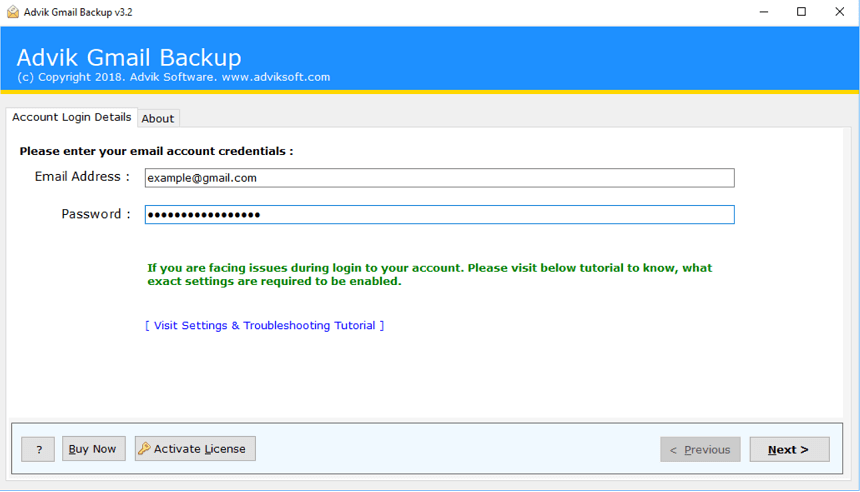
Step 1. Run Gmail to PST Export Tool and enter your Gmail login details to sign in.
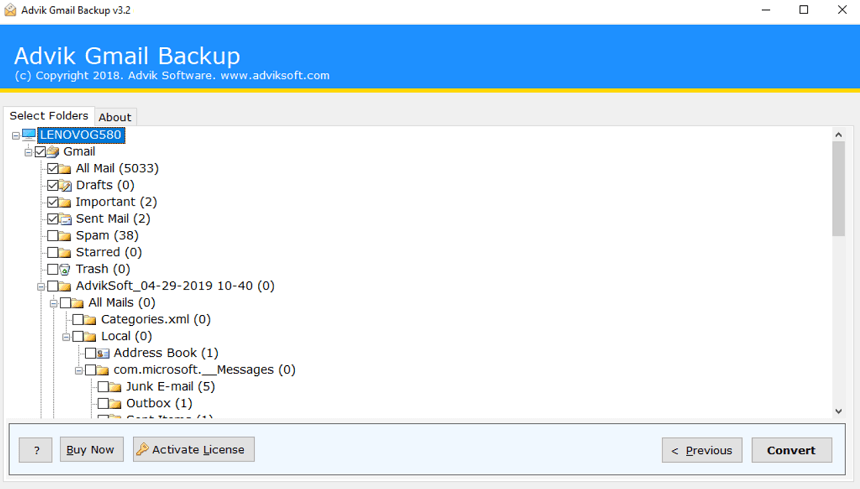
Step 2. Select the desired mailbox folder and click the next button.
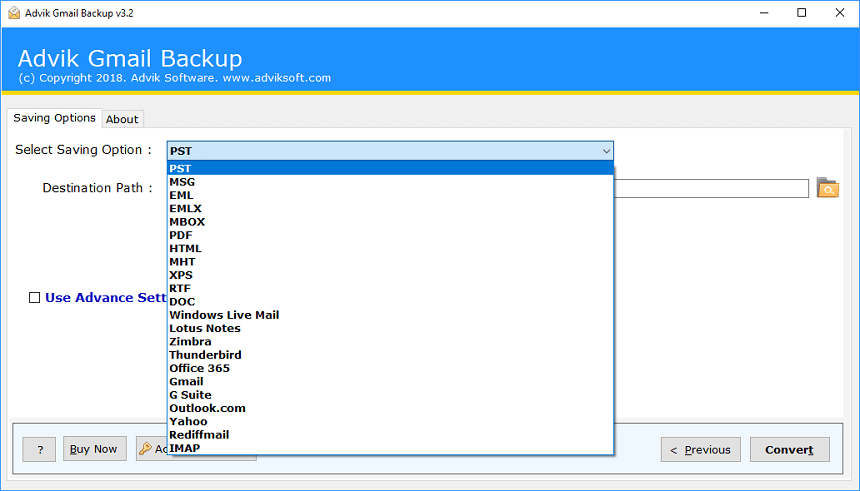
Step 3. Select PST as Saving Option from the list.
Step 4. Apply email filters using advanced settings (optional).
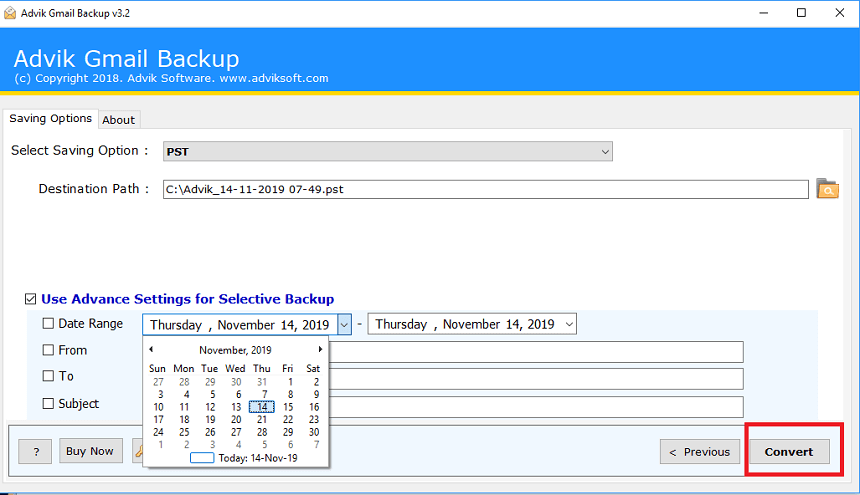
Step 5. Click the “Convert” button. Analyze the process.
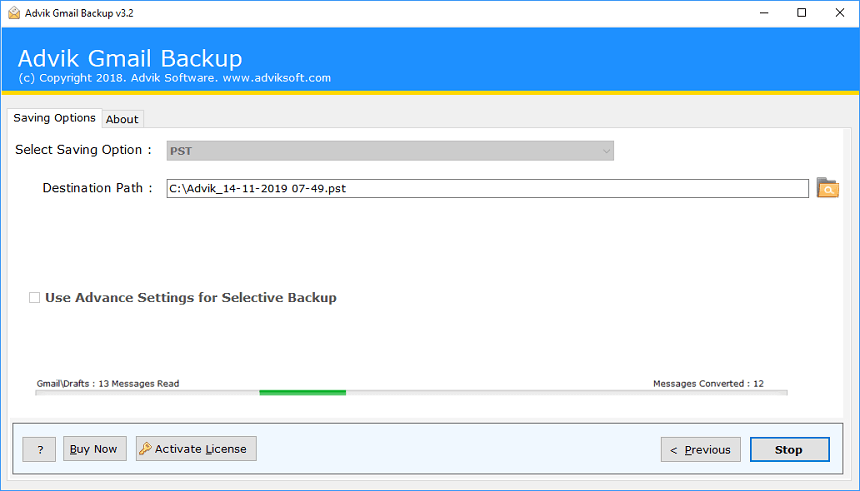
Done! Now, software will start downloading Gmail emails to PST format.
This MailBackup365 Gmail to PST Export Wizard helps millions of Gmail users to save their Gmails emails as PST format in your local drives. You can then use this PST format to access complete Gmail mailbox into your Outlook Application
Key Features of Gmail to PST Converter
Complete Backup of Gmail into PST Format
Mailbackup365 Gmail to PST wizard is an advanced utility that allows users to download the full backup of Gmail as a PST format. Users of this software have the option to select which mailbox folder they want to export as pst and which folders they want to ignore. With this wizard you can easily download emails from Gmail to PST including email folders such as Inbox, Outbox, Spam, Trash, Drafts and other custom folders
Preserve Key Elements
Export Gmail to PST Software saves important elements and maintains metadata. This tool helps you to restore your -mails in the original format without errors. After saving emails, various users were worried that it was in the original format or not. No worries, this software saves important elements of emails such as to, from, Cc, Bcc, header and footer info, and other important information.
Include Attachment Files
Attachments play a very important role in every email conversation, so this tool is designed to keep all your attachments intact. After the successful conversion, users can easily find their attachment files and open them in exact emails as in the original
Advanced Email Filters
The advanced email filter option is the most striking feature of the Export Gmail to PST Tool. This option allows you to apply email filters (subject, date range, from and to) to download only specific emails from the Gmail account.
Simplest Graphical User Interface
We have worked hard to create a solution that is both accurate and simple. That is why we keep the layout of the tool very simple and clean. Anyone with the basic knowledge of computer can easily operate this tool
Supports Windows OSYou can easily run this software on almost all versions or Windows OS. This is a very light-weight tool. You can install this tool on both 32-bit as well as 64-bit of machines
Few Words from our satisfied users:
This program is fantastic. I converted 7 years of Gmail email into PST format effortlessly. The interface of the tool is also very clean. We can easily export Gmail as PST format using this wizard.”
I am a freelancer and used this Gmail to PST export tool to migrate complete Gmail mailbox to PST format for providing service to my clients. This tool worked exactly what it says. Not only PST, This tool also provides users to migrate Gmail to Thunderbird, Apple Mail, Yahoo Mail, Zoho Mail etc. I just loved this tool.
MailBackup365 is is an email specialists from last 15 years. Our goal is to develop an email backup and conversion solution that’s both accurate and simple. Our solutions are so simple that it is the preferred choices for email forensics professionals, government agencies, universities and major corporations.
Prefer to Try Before You Buy?
If you’re not ready to buy, no problem. Simply take advantage of our free trial and start using MailBackup365 Gmail to PST Export today.
There’s no sign-up form and no credit card needed to download Gmail to PST Export Wizard and you can run it in trial mode for as long as you need. Take it for a test run. And you can see yourself that how easy it is to use. We want you to be confident that MailBackup365 is fully compatible with your computer and does what you need.
Ready to Buy Now? It’s Quick and Easy
If you are in need to convert unlimited number of Gmail emails to PDF format then MailBackup365 Gmail to PST Converter is the perfect choice for you.
Gmail to PST Converter
Standard License- Unlimited Gmail Accounts
- One Time Fees
- Lifetime Validity
- Lifetime Updates
- No Renewal Charges
- 24/7 Customer Support
- PST, MSG, EML, EMLX & MBOX
*No Extra Charges
Gmail to PST Converter
Business License- Unlimited Gmail Accounts
- One Time Fees
- Lifetime Validity
- Lifetime Updates
- No Renewal Charges
- 24/7 Customer Support
- PDF, PST, MSG, EML, EMLX, MBOX, HTML, MHT, XPS, RTF, DOC, Windows Live Mail, Lotus Notes, Zimbra & Thunderbird
*No Extra Charges
- Office 365, Gmail, G Suite, Outlook.com, Yahoo Mail, Rediffmail, and IMAP Option
*No Extra Charges
- Operating System : MailBackup365 Gmail to PST Converter runs under Windows 10, 8, 7, Vista, and XP.
- Internet : Online license activation, validation, and re-activation require an internet connection.
- Hardware Requirements : 512 MB of RAM, 100 MB of disk space. Pentium Class or higher processor.
- Software Delivery : Instant Delivery of License by Email
- Account Limitation : You can Backup unlimited Gmail Account as long as you have the licensed version of this tool. For Demo users you can backup 10 emails from each folders.

Frequently Asked Questions
Steps to export Gmail mailbox to PST format are as follows;
- Install and run MailBackup365 Gmail to PST Export Tool in your system.
- Enter your Gmail login details to sign in.
- Select the mailbox folder and click the next button.
- Select PST as a saving option.
- Click the “Convert” button. Analyze the process.
No, the tool will not save any login credentials in any database. You need to enter your complete login details everytime when you need to use this tool.
Yes, you can use this tool to save G Suite emails to PST format in your systrm.