Yahoo Backup Tool for Windows
Download Yahoo Emails to PC with Attachments
Know Here How to Take Backup Yahoo Emails
If you are struggling with data management and backup then you are at the right platform. Yahoo Backup Tool is the one of the most widely used tool which is assisting million of users to solve all their problems related to data. This is a very secure application which easily takes backup of Yahoo Email in personal system in various file formats such as PST, MBOX, MSG, PDF, TXT, PDF, HTML, EML, EMLX, etc. It also permit users to transfer emails from Yahoo into Google, Gmail, Outlook, Office 365, and another Yahoo account.
There are several features of this tool which makes it easy to use. Some of them are listed below:-
- Can easily transform Yahoo mails to other file formats
- Install Yahoo Emails to Pendrive / System / Hard dis
- Able to transfer Yahoo Emails to all window versions
- Mail filters by date option is available for specific backup of Yahoo Emails
- Manages a hierarchy of data
Why you Should Use Yahoo Backup Wizard?
There might be some problem with your Yahoo Emails. It could be down, server not responding, or you can’t login. Sometimes Yahoo Email also get corrupted and cannot be easily accessed by the users. So, it’s always better to have backup of your data that you may not loose any important file. By using Yahoo backup tool, anyone can do it without facing any difficulty.
How Can You Use This Tool for Backup of Data?
This is a comprehensive application that install or backup Yahoo Emails in different file formats. It also allow users to transfer emails from Yahoo into Gmail, Hotmail, Thunderbird, Office 365, and another Yahoo account.
The software is entirely embedded with extremely optimized and enhanced algorithm to create the Yahoo email backup process effective. This wizard permits a great way to download the Yahoo mails folder directly to the user's computer as per his/her requirement. During the whole process of Email backup there is no change in the Email.
Free Download100% SecureSteps to Backup Yahoo Emails are as follows;
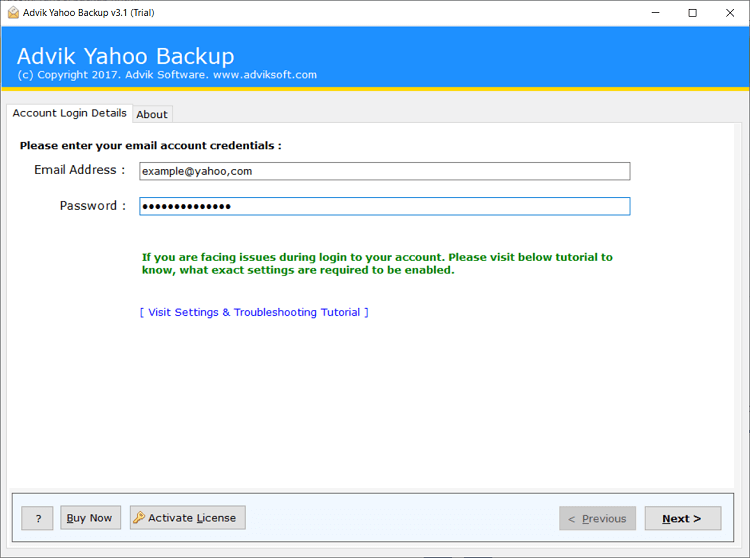
Step 1. Run Advik Yahoo Backup Tool and sign in.
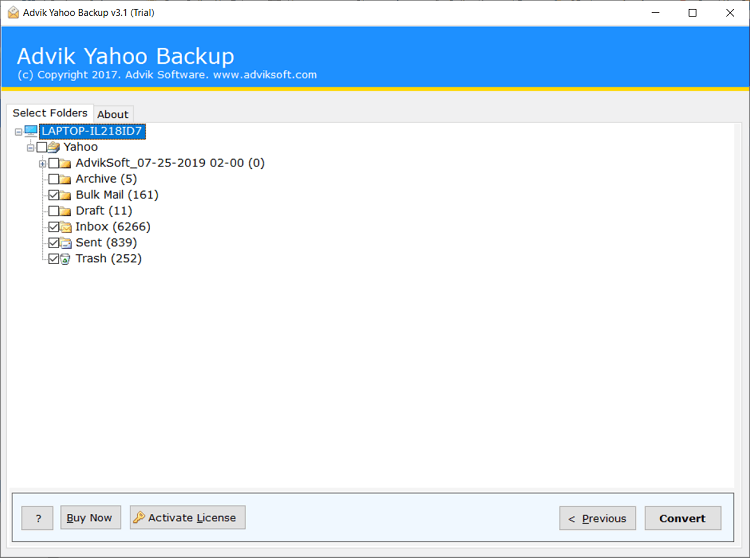
Step 2. Select mailbox folders for backup.
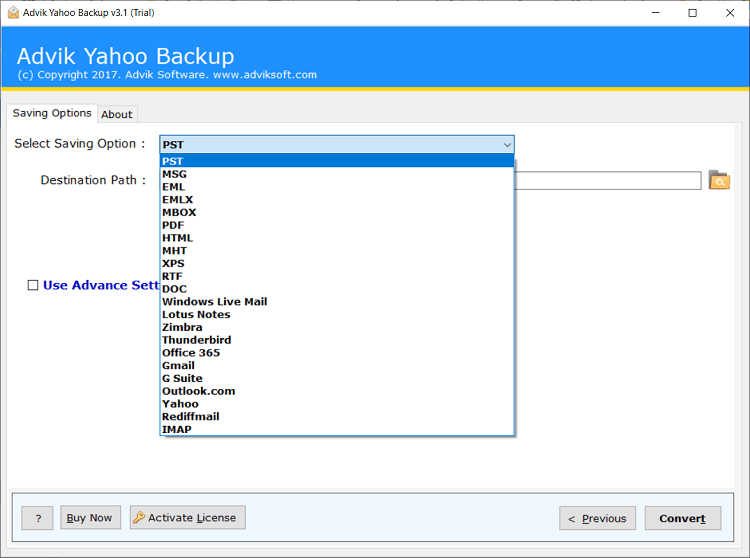
Step 3. Choose saving option from the list.
Step 4. Click Convert button to start backup process.
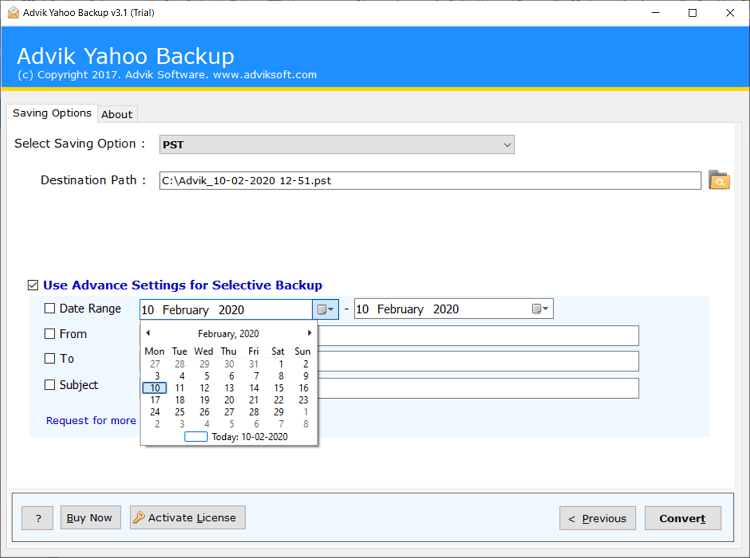
By taking the above mentioned step one can install the Backup of gmail emails in various file types.
Yahoo Backup Tool is helping billion of users to save their data in local drives, computers, etc.
Prominent Features of the Yahoo Mail Backup Software
Backup Ymail Emails
Taking backup of your data is always a good decision as it will help you to recover your in the future if you lose your data. Using this software one can keep backup of all their Yahoo emails including attachments and mailbox items.
Store Yahoo Emails to Hard Disk
Using this software one can download all the texts from each file of a user email account. This tool will allow the user to save all the emails from every folder like Inbox, Outbox, Sent Items, Drafts and all other customized files of the yahoo user account into your hard drive.
Maintains Folder Hierarchy
In most of the cases after conversion, it is difficult to manage data and files hierarchy. So users have to suffer and they have to face problems. But, by using this wizard it is very comfortable and easy to maintain folder and sub folder hierarchy. It also keeps your data safe and secure.
Compatible with Windows OS
This application is generally compatible with all the significant windows operating systems and it also supports file and folders of each version of the Yahoo mail. It allow users to interact with other operating systems without causing any trouble.
Date Range Filter
If your email box is loaded with the unnecessary email and you don’t need them anymore then you can use the date range filter. This is a wonderful feature which help the user to get rid of unwanted files by selecting the date range feature to evaluate email items by providing start and end date as the parameter for a particular interval of time.
Convert Yahoo Mails to other File FormatsIt is a well known and reliable tool to change your Yahoo emails into PST, EML, EMLX, MBOX, MSG, HTML, MHT, PDF and TXT file formats. The user can work on any file format according to its convenience.
Remove Yahoo Emails after DownloadYahoo Backup Tool is merged with some incredible options, one such feature is Delete After Download option. This option allows the user to discard emails from Yahoo mail account once backup for Yahoo mail folders or items is done. The user can choose this option to archive Yahoo mail folders and vacant the account space after they are successfully saved. This options provide the users more space to save their data without exceeding the limit.
What our users have to say about Yahoo Backup Tool
"This Email Backup Wizard is a safe, trustworthy and virus free application which helped me to backup my emails easily and in less time from my Yahoo Account in numerous file formats. It can also migrate Emails which had made it more efficient.”
I am really grateful that I got this amazing tool to backup my emails. It has various alluring features which made me use this tool again and again. One of the best feature is date range filter which makes my work easier.
One of the most important feature of this tool is to convert Yahoo mails to other file formats without any hassle and it can also transfer Yahoo mails to hard drive. Thank you for such an efficient tool.
Yahoo Mail Backup Tool has been one of the most renowned software. Our main aim is to make Email Backup handy, simple and more precise. We try our best to provide our customers with the world class service.
In Doubt Then Go for Demo
If you are not sure whether to buy the software or not. No worries. Try the free demo version of the application.
You don’t need to register just download the tool, access it in trial mode and can get to know how smoothly it works and completely compatible with your system.
Ready to Buy Now? It’s Quick and Easy
If you are in need to convert unlimited number of Gmail emails to PDF format then MailBackup365 Gmail to PST Converter is the perfect choice for you.
Yahoo Backup Tool
Standard License- Backup Unlimited Yahoo Accounts
- One Time Fees
- Lifetime Validity
- Lifetime Updates
- No Renewal Charges
- 24/7 Customer Support
- PST, MSG, EML, EMLX & MBOX
*No Extra Charges
Yahoo Backup Tool
Business License- Backup Unlimited Yahoo Accounts
- One Time Fees
- Lifetime Validity
- Lifetime Updates
- No Renewal Charges
- 24/7 Customer Support
- PDF, PST, MSG, EML, EMLX, MBOX, HTML, MHT, XPS, RTF, DOC, Windows Live Mail, Lotus Notes, Zimbra & Thunderbird
*No Extra Charges
- Office 365, Gmail, G Suite, Outlook.com, Yahoo Mail, Rediffmail, and IMAP Option
*No Extra Charges
- Operating System : MailBackup365 Yahoo Backup Tool runs under Windows 10, 8, 7, Vista, and XP.
- Internet : Online license activation, validation, and re-activation require an internet connection.
- Hardware Requirements : 512 MB of RAM, 100 MB of disk space. Pentium Class or higher processor.
- Software Delivery : Instant Delivery of License by Email
- Account Limitation : You can Backup unlimited Gmail Account as long as you have the licensed version of this tool. For Demo users you can backup 10 emails from each folders.

Frequently Asked Questions
To transfer Yahoo emails to Hard Drive, follow the steps mentioned below
- Open Yahoo Email Backup Tool
- Enter login credentials.
- Select mailbox folders to export.
- Select the files and folders for backup
- Hit Convert button to start backup proceducer.
Yes, you can do it with the assistance of Yahoo mail backup tool you can easily migrate your Yahoo emails into Gmail. Just all you need to do is, you have to give the credentials of your Yahoo and Gmail accounts.